




Introduction
A dryer that runs but does not heat can disrupt your entire laundry routine. Many LG dryer owners experience this issue at some point, wondering if the appliance has a reset button or if something inside needs repair. While LG dryers do not have a traditional “reset button” like older machines, they do have ways to reset the system and several components that may need attention when the dryer stops heating. This article explains what to do when your LG dryer is not heating, how to reset it properly, common causes of heat loss, and step-by-step troubleshooting methods.
Does an LG Dryer Have a Reset Button?
Most LG dryers do not have a physical reset button for the heating element. However, they can be reset electronically through a simple procedure that clears error signals and helps the appliance restart properly.
How to Reset an LG Dryer
Follow these steps:
-
Turn off the dryer.
-
Unplug it from the electrical outlet.
-
Wait at least 5 minutes. This allows internal sensors and boards to reset.
-
Plug the dryer back in.
-
Restart the dryer and run a test cycle.
This reset will not fix mechanical issues, but it can solve minor electronic glitches that prevent heating.
Why Your LG Dryer Is Not Heating
Several components must work together for the dryer to produce heat. If one part fails, the dryer may still spin and run normally while producing cold air. Understanding the common causes helps you pinpoint the issue faster.
1. Tripped Thermal Fuse
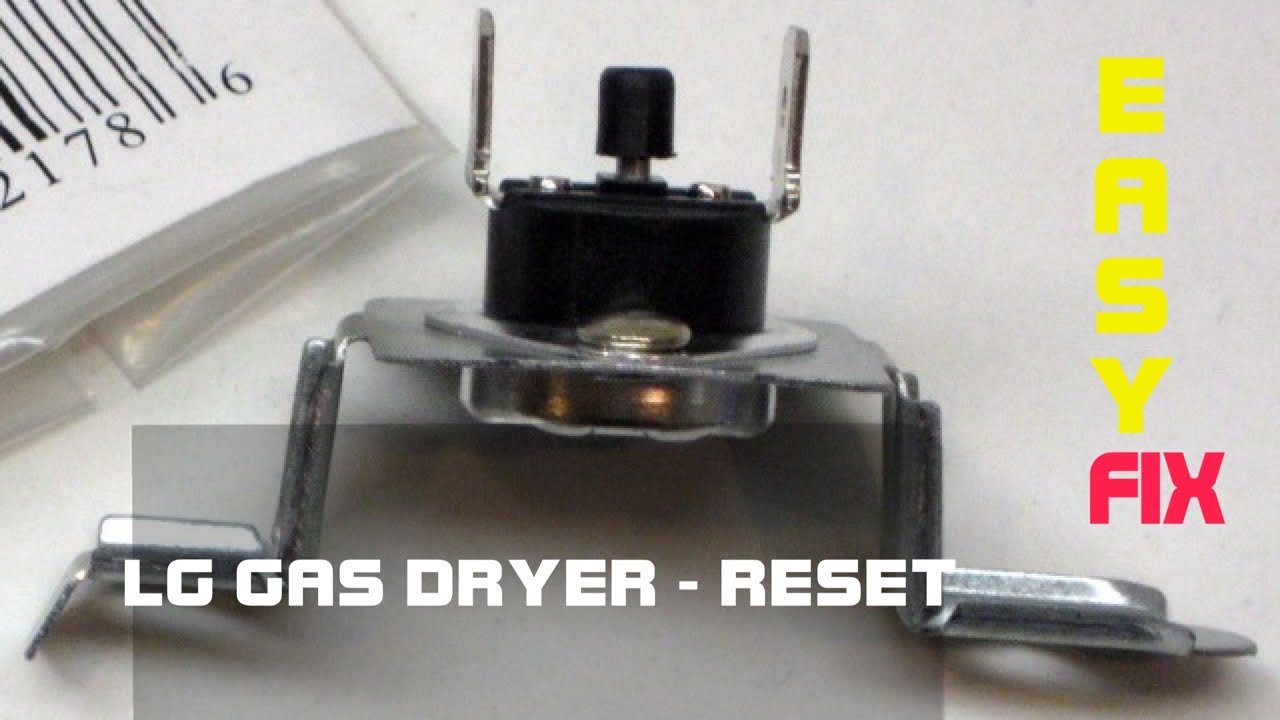
The thermal fuse is a safety device that shuts off heat when the dryer becomes too hot. If the fuse blows, the dryer will run but produce no heat at all.
Common causes of a blown fuse:
-
Lint buildup
-
Blocked vent
-
Airflow restriction
-
Overloaded dryer
A blown thermal fuse must be replaced because it cannot be reset.
2. Heating Element Failure (Electric Models)
On electric LG dryers, the heating element is responsible for generating heat. If it becomes worn out or cracked, it stops functioning.
Signs of a bad heating element:
-
Dryer runs with cold air
-
Clothes stay damp after long cycles
-
Burning smell before heat failure
Replacing the element usually restores proper heating.
3. Igniter or Gas Valve Issue (Gas Models)
If you have a gas-powered LG dryer, the heating system works through a burner controlled by an igniter and gas valve coils.
You may have a heating issue if:
-
The igniter glows but never ignites the flame
-
You hear clicking but no heat appears
-
Heat starts but stops after a few seconds
A faulty igniter or set of coils prevents the flame from staying lit.
4. Blocked Lint Filter or Vent
The dryer must push moist air out through the vent. If the vent is clogged, the dryer may overheat and automatically shut off the heat for safety.
Signs of vent blockage:
-
Dryer feels hot outside
-
Clothes take multiple cycles to dry
-
Weak airflow from the exterior vent flap
-
Excessive lint inside the dryer
Cleaning the vent system often restores heat.
5. Faulty Thermostat or Sensor
LG dryers use a thermostat and moisture sensors to regulate temperature. If either fails, it may tell the dryer to reduce or stop heating.
Issues caused by faulty thermostats:
-
Intermittent heat
-
Heat shuts off mid-cycle
-
Dryer stays warm but not hot
Replacing the thermostat can solve these problems.
6. Incorrect Power Supply
Electric LG dryers require 240 volts to heat. If one side of the breaker trips, the dryer may still run but will not heat.
Check for:
-
Half-tripped breaker
-
Damaged outlet
-
Loose connection
-
Burnt power cord ends
Resetting the breaker may solve the issue immediately.
Read more:E320 vs E520: A Clear Comparison of Two Popular Vitamix Blenders
7. Control Board Malfunction
The control board sends power to the heating element. If it malfunctions, the dryer may not heat even if all other parts are working.
Possible symptoms:
-
Dryer starts but shuts off randomly
-
Certain cycles produce no heat
-
Buttons or display act strangely
Control board issues require professional diagnosis.
Step-by-Step Troubleshooting Guide
1. Perform the Reset
Start with the simplest solution—reset the dryer by unplugging it for 5 minutes.
2. Clean the Lint Filter and Vent
Even if the vent looks clear, lint may be hidden in the duct.
Steps:
-
Remove lint screen and clean thoroughly.
-
Disconnect the vent hose.
-
Check for lint clumps or blockages.
-
Inspect the outdoor vent flap.
-
Clean the entire vent tube with a brush if needed.
Airflow problems are one of the most common causes of heating failure.
3. Test the Power Supply
Check your breaker box and make sure:
-
The dryer is getting full power
-
No breakers are partially tripped
-
The outlet is not damaged
Reset the breaker fully by switching it off and then back on.
4. Test the Thermal Fuse
If you can access the back of the dryer, locate the thermal fuse.
You may need to replace it if:
-
The dryer overheated
-
The vent was clogged
-
There was poor airflow
A multimeter is often required to test the fuse.
5. Inspect the Heating Element
Remove the rear panel and check the heating element for breaks or burn marks.
If damaged, replacing it is the only solution.
6. Check Gas Ignition (Gas Models)
Turn the dryer on and watch through the small flame window.
You should see:
-
Glow from the igniter
-
Click sound
-
Blue flame
If any step is missing, the igniter or valve coils may need replacement.
7. Test the Thermostat
Use a multimeter to check for continuity. A faulty thermostat may prevent heat or stop it too soon.
8. Examine the Control Board
If all other parts are working, the control board may be the issue. These boards can fail due to age, power surges, or internal damage.
Preventing Future Heating Problems
1. Clean the Vent Every 6 Months
Lint buildup reduces airflow and overheats the dryer.
2. Avoid Overloading
Too many clothes block heat circulation.
3. Use the Correct Temperature Settings
Heavy loads need higher heat settings.
4. Maintain the Lint Filter
Clean before every cycle and wash monthly to remove fabric softener residue.
5. Schedule Annual Inspections
A quick yearly check can prevent costly breakdowns.
When to Call a Professional
You should call a technician if:
-
You smell gas
-
The control board fails
-
You cannot access internal components
-
The dryer repeatedly trips the fuse
-
You are unsure about electrical testing
A professional ensures safe, accurate diagnosis and repair.
Conclusion
An LG dryer that is not heating can be caused by a thermal fuse, heating element, gas system failure, clogged vent, thermostat issue, or power problem. While most LG dryers do not have a physical reset button, resetting the machine by unplugging it can help clear minor electrical faults. With the right troubleshooting steps—such as cleaning vents, checking fuses, and testing components—you can often restore heat without expensive repairs. If the problem persists, professional service may be needed to inspect the internal heating system. A well-maintained LG dryer will function efficiently, save energy, and keep your laundry routine running smoothly.
Read more: https://wowhead.co.uk/